
Dynamic Lists can automatically sync contact changes to your CRM or webhook destination on a schedule you control. Configure sync settings once, and the system handles pushing list updates to Bonzo or your Profile webhook automatically.
Where to Find Dynamic Lists Sync
From your dashboard, navigate to Workspace → My Contacts and select any Dynamic List. Click "Sync Settings" to configure automatic syncing for that list.
How Dynamic Lists Sync Works
The sync system monitors your Dynamic List for changes and pushes contact updates to your selected destination based on your chosen frequency. When contacts are added, removed, or updated in your list, these changes are queued and sent during the next scheduled sync cycle.
Setting Up Sync Destinations
Your destination options come from Profile → Settings → Webhooks & Integrations. You can sync to your connected Bonzo CRM or any Profile webhook you've created for contacts.
Configuring Sync Settings
Basic Settings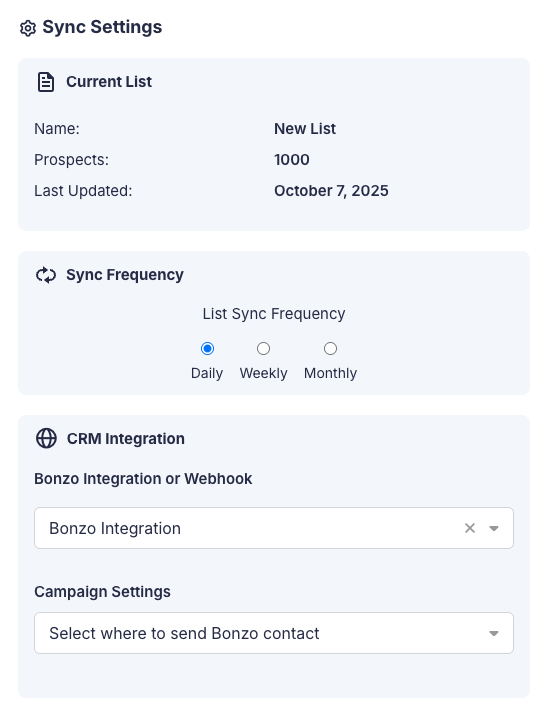
- Destination: Choose between your Bonzo CRM connection or a Profile webhook
- Sync Frequency: Set contacts to sync daily, weekly, or monthly
Bonzo-Specific Options
When syncing to Bonzo, you can configure additional settings that control how contacts are handled in your CRM.
- Campaign: Select which Bonzo campaign to assign synced contacts
- Pipeline Stage: Choose the pipeline stage for contacts entering Bonzo
Advanced Bonzo Settings
- Auto-Sync Changes: Automatically push contact updates to Bonzo when list membership changes
- Merge Duplicates: Combine duplicate contacts in Bonzo rather than creating separate records
- Re-attach Duplicates to Campaign/Pipeline: Move existing Bonzo contacts to the selected campaign and pipeline stage
How to Set Up Dynamic Lists Sync
- Open your Dynamic List and click "Sync Settings"
- Select your destination from the dropdown menu
- Choose your sync frequency: daily, weekly, or monthly
- If using Bonzo, select your campaign and pipeline stage
- Configure advanced Bonzo settings if needed
- Click "Save" to enable automatic syncing
Managing Sync Status
The system automatically handles sync failures by retrying up to three times. If a sync ultimately fails, you'll see the status in your sync settings and can manually retry or adjust your configuration.
Summary
Dynamic Lists Sync automates your CRM workflows by pushing contact changes to Bonzo or your webhook destinations on your chosen schedule. Configure your sync settings once per list, and the system handles the rest automatically.
Comments
0 comments
Article is closed for comments.