
Overview
Quick Lists provides a streamlined way to search loan officers inside MMI. It replaces legacy, one-off search cards with a unified filter experience that returns results instantly—without requiring you to save a list first. Quick Lists is designed for fast, ad-hoc searching while giving you the option to export results, push contacts to your CRM, save your search, or convert your search to a Dynamic List when ongoing tracking is needed.
Where to Find Quick Lists
- Navigate to Mortgage → Loan Officers
- Select the Quick Lists tab (default for beta users)
When the page loads, you’ll see a pre-populated list of the top 100 loan officers nationwide, ordered by performance metrics.
How Quick Lists Works
Quick Lists combines:
- A global search bar for instant lookups
- A real-time filter panel for narrowing results
- Quick Filter Templates
- A dynamic results table that updates as you filter
Searching Loan Officers: Global Search Bar
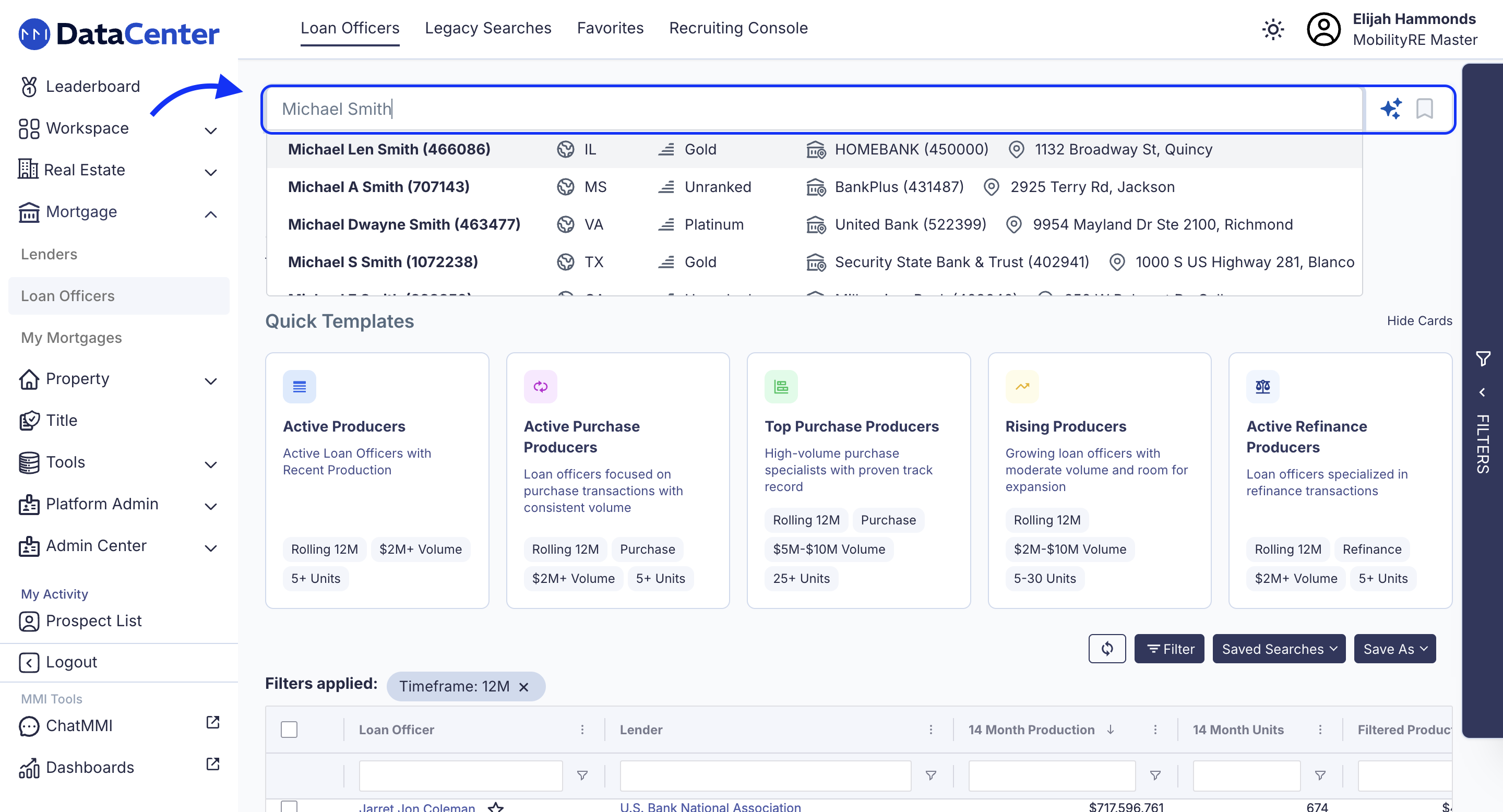
Use the search bar at the top of the page to quickly find loan officers by:
- Name
- NMLS ID
Results update instantly as you type making it easy to jump directly to a specific loan officer without navigating multiple search cards.
Quick List Templates
LO Quick List Templates allow you to apply prebuilt, high-value search criteria to Loan Officer prospecting in one click. Instead of rebuilding the same production filters each time, you can use strategically curated templates designed around common outreach scenarios. Each template applies a defined set of filters instantly, helping you move from search setup to action faster.
When you select a template card, a confirmation modal displays the full criteria that will be applied.
If you manually adjust any filter—such as volume, units, timeframe, or loan type—the template will automatically deselect while preserving your modified filters. Nothing resets, and you maintain full control to refine further.
Available Templates
Five predefined templates are available:
- Active Producers - Rolling 12 months, All States, $2M+ volume, 5+ units, Loan Officer role
- Active Purchase Producers - Rolling 12 months, Purchase only, $2M+ volume, 5+ units, Loan Officer role
- Top Purchase Producers - Rolling 12 months, Purchase only, $5M–$10M volume, Last 3 months ≥ $3M, 25+ units, Loan Officer role
- Rising Producers - Rolling 12 months, $2M–$10M volume, 5–30 units, Loan Officer role
Active Refinance Producers - Rolling 12 months, Refinance only, $2M+ volume, 5+ units, Loan Officer role
Templates are designed to reduce repetitive filter setup, improve consistency across teams, and accelerate qualified prospecting workflows.
Using Quick List Filters
On the right side of the screen, you’ll find the Quick List Filters. Available filters include:
Production & Performance
- Transaction count (min / max)
- Total production volume
- Average loan amount
- Units produced
- Performance-based scoring (where applicable)
Time Frames
- Rolling time windows (e.g., last 30, 60, 90 days)
- Default is a rolling 12-month period
Loan Attributes
- Loan types (Non-QM, FHA, VA, Conventional, etc.)
- QM / Non-QM indicators
Licensing & Compliance
- License states (multi-select)
- Regulator-specific licensing (e.g., CA DFPI)
Geography
- State
- County / borough
- City
- ZIP code
Search Results
As filters are added, you’ll see active filter “chips” displayed so you always know what criteria is applied. Simply click "Apply" and watch as results for your criteria quickly update the search table.
Taking Action on Results
Once your results are narrowed, you can take action directly from the table.
Selecting Loan Officers
- Use checkboxes to select individual loan officers
- Use bulk select to choose multiple results
When selections are made, a bulk action bar appears with options to:
- Export to CSV – Download selected loan officers
- Push to CRM – Send contacts directly into your connected CRM
This makes it easy to move from insight → action in a single workflow.
Saving Lists:
Save your results to within your Quick lists as a "Saved Search" or transition your results into "Dynamic List"
Quick List
If you find a segment you would like to return to:
- Apply your desired filters
- Click Save as
- Name your list and save
Your new Saved Search List will appear under the Saved Searches Icon.
Dynamic List
If you want to track a segment over time or sync it regularly to your CRM:
- Apply your desired filters
- Click Save as Dynamic List
- Name your list and save
Dynamic Lists live under:
My Contacts → Loan Officers
Dynamic Lists automatically update as loan officers enter or exit the criteria and can be used for ongoing CRM syncs and workflows.
Quick Lists vs. Dynamic Lists
| Quick Lists | Dynamic Lists |
|---|---|
| Instant search & filtering | Saved, ongoing tracking |
| No save required to view results | Must be saved to populate |
| Ideal for one-off or short-term searches | Ideal for recurring syncs |
| Optional save | Always saved |
Think of Quick Lists as fast discovery, and Dynamic Lists as long-term monitoring and automation.
Legacy Searches
Existing search cards (Top Lenders, State Agent Search, LO by LTV Rank, etc.) are still available under Advanced Searches.
Quick Lists helps you search faster with less guesswork by combining all filters in one place and enabling a seamless flow from search to export, CRM, and saved lists. It also lays the foundation for future unified search across loan officers, realtors, title companies, and more.
Comments
0 comments
Article is closed for comments.